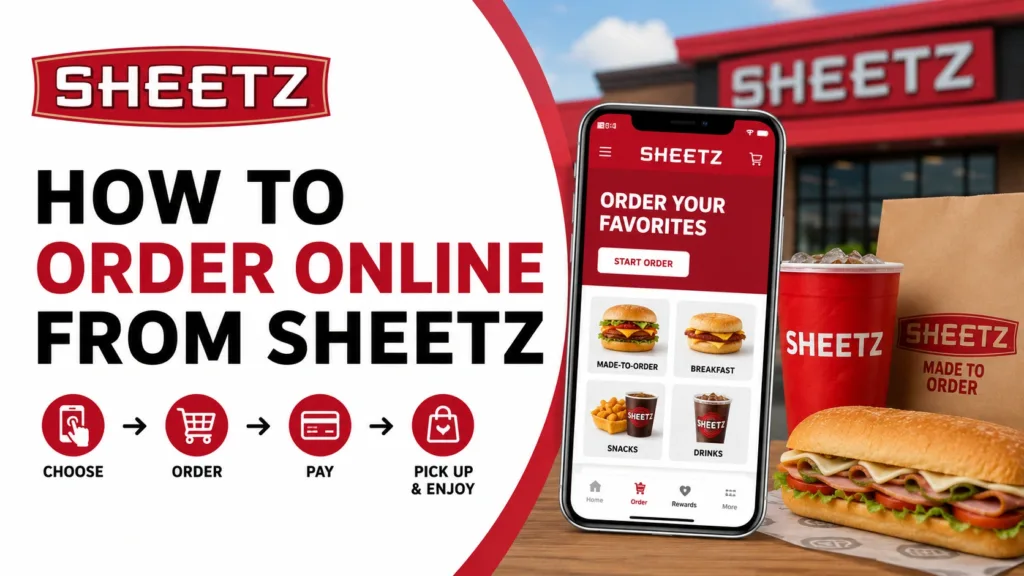
How to Order Online from Sheetz?
Learn how to order online from Sheetz using the website or mobile app, customize meals, choose pickup options, apply rewards, and enjoy fast, convenient ordering anytime.
Method 1: Order with the Sheetz App (Best Option)
The Sheetz mobile app is the easiest way to order food online. It lets you customize meals, pay online, earn rewards, and save favorite orders for faster checkout.
Step 1: Download the Sheetz App
Download the Sheetz Food Delivery & Rewards app on your smartphone.
The app allows you to:
- Order ahead
- Pay online
- Save favorite meals
- Earn rewards
- Access exclusive app deals
Step 2: Create an Account or Log In
Open the app and create your account, or log in if you already have one.
Having an account helps you:
- Save favorite orders
- Earn My Sheetz Rewardz points
- Track previous orders
- Get personalized offers
Step 3: Select Your Preferred Store
Allow location access, or manually choose your nearest Sheetz location.
This helps the app show:
- Nearby stores
- Available menu items
- Pickup times
- Delivery availability
Step 4: Tap “Order”
Tap the Order button to begin building your meal.
You’ll see categories like:
- Breakfast
- Subs
- Burgers
- Drinks
- Snacks
- Pizza
- Salads
- Appz & Sidez
Step 5: Customize Your Food
Sheetz is known for Made-To-Order meals, so you can customize your food exactly how you want.
Choose your:
- Bread
- Cheese
- Meat
- Sauces
- Toppings
- Extras
Step 6: Add Items to Your Cart
Once your food looks perfect, tap Add to Cart.
You can continue shopping or move to checkout.
Step 7: Choose Your Pickup or Delivery Method
Sheetz offers multiple fulfillment options depending on location.
Choose from:
- Pickup
- Curbside Pickup
- Drive-thru (select stores)
- Delivery (available in some areas)
Step 8: Pay Online
Complete your order using your preferred payment method.
Payment options may include:
- Credit card
- Debit card
- Mobile payment
- Gift card
- Reward points
Step 9: Wait for Notification
Once your order is ready, the app will notify you.
Then simply:
- Pick up inside
- Use curbside pickup
- Go through the drive-thru
- Receive delivery
Method 2: Order on the Sheetz Website
If you prefer ordering from your computer, Sheetz also offers online ordering through its official website.
The website gives you the same ordering and customization features as the mobile app.
Step 1: Open the Sheetz Online Ordering Website
Visit the official Sheetz online ordering page.
Step 2: Select Your Store
Choose your nearest or preferred Sheetz location.
Step 3: Build Your Meal
Browse categories and customize your food exactly how you want.
Step 4: Review Your Cart
Double-check your items, quantities, and customizations before checkout.
Step 5: Pay Online
Complete your payment securely.
Step 6: Pick Up When Ready
Arrive at your selected pickup time and collect your order.
Pro Tip
If you regularly order the same meal, the Sheetz app lets you save favorite orders and reorder them in just a few seconds.
This is perfect if you always order:
- Morning coffee
- Breakfast sandwiches
- Burgers
- Protein snacks
- Late-night meals
My Experience Ordering from Sheetz
After using both options, I found the Sheetz app faster and more convenient than ordering on the website. Saving favorite meals, earning rewards, and getting real-time pickup notifications make repeat ordering much easier.
FAQs
Final Thoughts
Ordering online from Sheetz is simple, fast, and flexible. Whether you use the Sheetz app or website, you can customize meals, pay online, earn rewards, and choose pickup, curbside, drive-thru, or delivery. For regular customers, the Sheetz app usually provides the best experience.
Want to explore meals before placing your order? Check out our complete Sheetz food menu with popular breakfast items, drinks, snacks, and Made-To-Order favorites.



7 Comments